
What Your Instagram Analytics Mean
Ever wanted to find out which posts perform the best or what your follower demographics look like? Read more to understand everything your analytics can tell you.
Ever wanted to find out which posts perform the best or what your follower demographics look like? If you have a business or creator account on Instagram, you get access to key insights that can help you understand your target audience. Read more to understand everything your analytics can tell you.
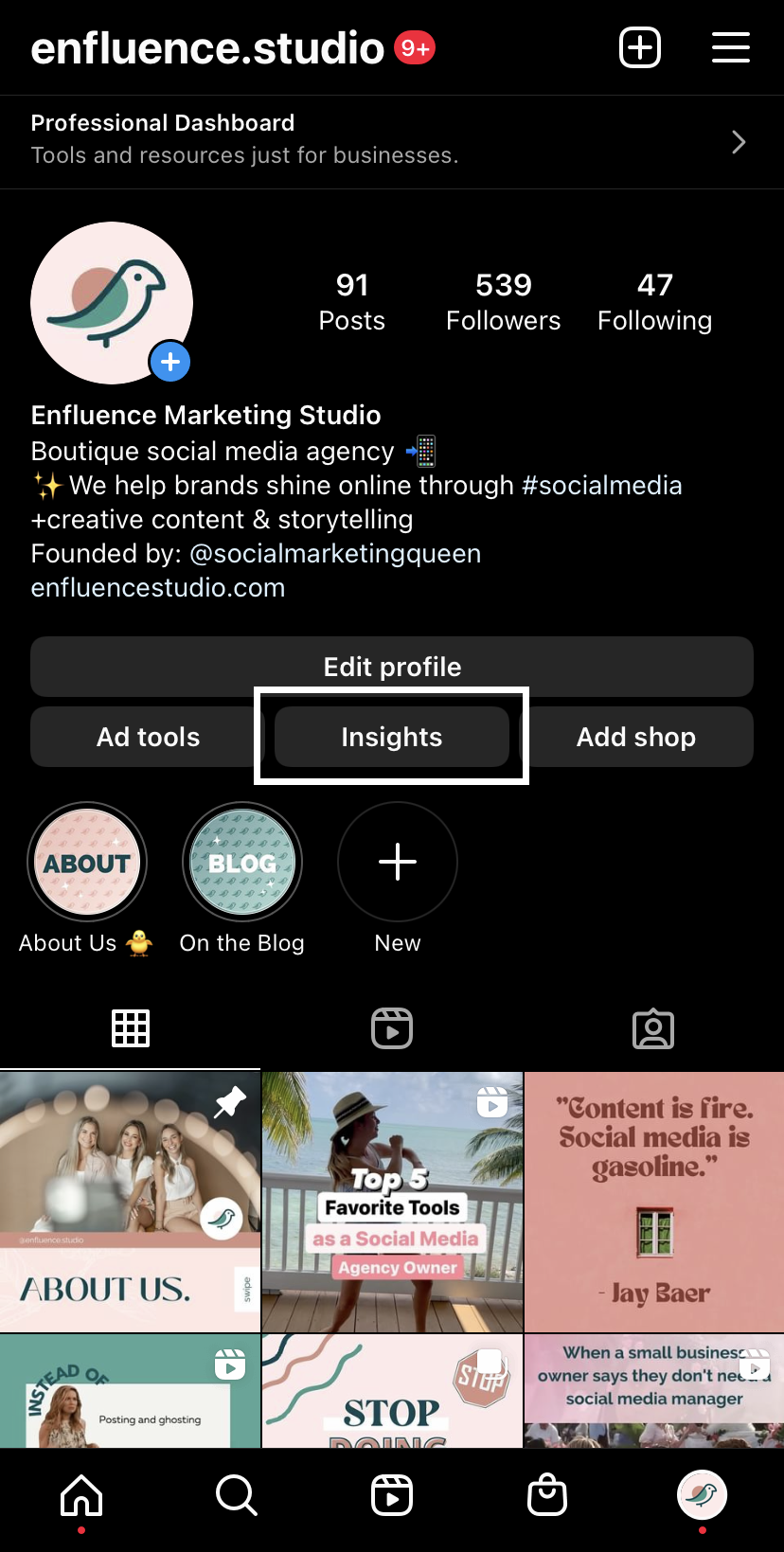
Gain Access to Insights
First, to gain access to insights you must switch your account from Personal to Professional in your account settings. For more information on professional accounts, read Difference Between Creator and Business Accounts on Instagram. Then, you should be able to access all your insights.

Insights Overview
On the insights overview page, you’ll see an overall report of analytics based on the selected time period. You can change the date range from the last 7 days to 90 days or choose custom dates by tapping the drop-down at the top right.
Accounts reached tells you how many unique accounts have seen your content (posts, Stories, Reels, live videos).
Accounts engaged is the number of accounts that have interacted with your content. Interactions include likes, saves, comments, shares or replies.
Total followers simply tells you how many followers you currently have and recent trends in follower count within the date range.
Content You Shared shows you how much content you’ve posted in the chosen time period.
Tapping on each of these metrics will give you even more valuable information.
Accounts Reached


If you look more at accounts reached, you’ll get more details about the demographic of these accounts. Keep in mind that these stats are gathered from the time period you selected, so changing it will greatly affect the output. Here you’ll see where these accounts are located, their age range, and gender. You’ll also see how many of your views are from followers versus non-followers. Content reach is a super helpful measure that will tell you what type of content gets you the most reach. So if you’re looking to expand your reach, these insights will tell you just what audience you appeal to and what kind of content gets you seen. For example, if Reels provides great reach for your account, consider posting more with your target audience in mind.
Accounts Engaged


We love talking about engagement here, so here’s how to check your own engagement levels! Similar to accounts reached, you’ll get an overview of your engaged audience’s location, age range, and gender as well as how many of them are followers. But what we want to highlight here is content interactions. This breaks down all interactions on posts, Stories, and Reels in the selected time period. By seeing what kind of content gets you the most engagement, you can use that to tailor content for the future.
Total Followers


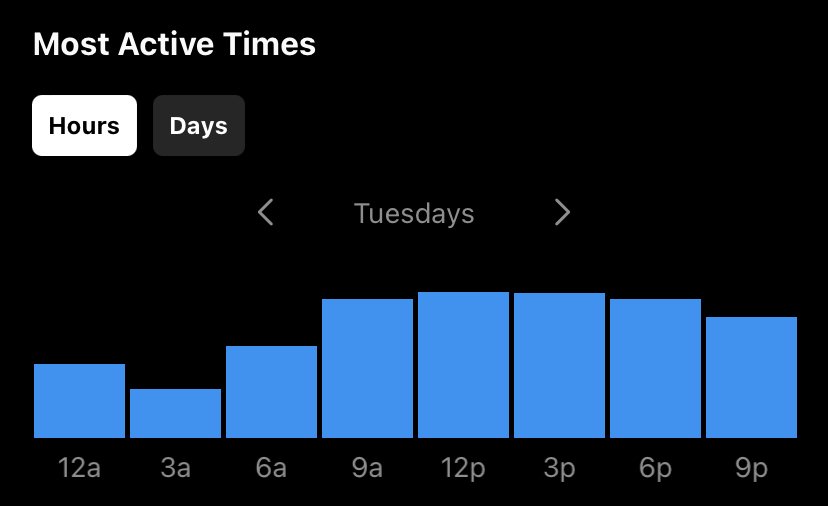
Getting a closer look at your followers not only shows you their basic demographics but also provides trends in follows and unfollows as well as when they’re most active. Your follower growth is provided on a line chart within your chosen date range and you can tap around to see specific dates where you had noticeable spikes. Most Active Times will answer the famous question, “What is the best time to post on Instagram?” Here you can see what days and hours per each day your followers are the most active and when you should post so your content is more likely to be seen. Knowing more about your followers will help you understand them better and make content that they WANT to consume.
Content You Shared


By taking a look at the content you’ve shared, you can get an overall ranking of posts, Stories, and Reels based on a chosen metric. Under posts, you can filter based on whether they’re photos, carousels, or videos (not Reels) and choose from a number of metrics as well as a custom time period. Reels are categorized separately, and let you filter based on only 7 different metrics: comments, likes, saves, reach, plays, shares, and Reels interactions. Under Stories, you can choose from metrics unique to Stories such as link clicks, replies, and so much more. The opportunities are endless when you are given this much knowledge!
_______
enfluence Marketing Studio is a full-service social media marketing agency offering social media management and 1:1 coaching.

Reels Tips to Improve Views
Looking to level up your Reels game? Read more about our top tips for raising views and engagement:
Looking to level up your Reels game? Well you came to the right place. Reels are now more important than ever with the latest changes to merge all videos into the Reels format. Today we are going to share some of our top tips for raising views and engagement:

Add a Title
Give some context to your Reel with an attention-grabbing title in the beginning! Also make sure that when you go to publish you customize the cover image since this is how it will look in your feed. Instagram gives you the option of choosing a specific frame from your video or uploading a custom image, so put your title here!
Keep Text Minimal & Refer to Caption
You never want to overwhelm viewers with too much text! You have up to 90 seconds to record your Reel but you’ll want to get your point across quicker so as to not lose attention. If you have a lot of juicy information to share, direct viewers to your caption to go into more detail.
Use Relevant Hashtags
Including hashtags relevant to the content in your Reel will also help increase reach by putting your videos in the hashtag category that your target audience is looking for. For our guide on good hashtag etiquette, read Hashtag Do’s and Don’ts.

Add a CTA at the End
A CTA, or call-to-action, is a prompt that will encourage your audience to take action. CTAs are key for conversion so depending on your marketing strategy, you’ll want to utilize the right language depending on your purpose. And beware of coming off too salesy, some great low-pressure examples are:
Sign up
Learn more
Follow for more
Read caption
Try for free
Show Face and Add Movement
Reels are a great way to showcase your wonderful personality and humanize your brand, so don’t be afraid to show your face! And don’t worry if your dancing or lip syncing skills are lacking, a little bit of movement and energy will help to keep your audience engaged.
Use Great Lighting
Make it a priority to invest in some great lighting to make your video quality seem more professional. And we don’t mean expensive studio lights, a simple $30 selfie ring light with a tripod will do the job. You can even use good old-fashioned natural sunlight if you have a nice big window nearby.

Collab with similar accounts
Consider collabing with other accounts in your industry to share the love! Collaborations will bring another audience to you and vice versa. You may even gain valuable knowledge from their unique experiences.
Use Consistent Font and Colors
We’ve said it before and we’ll say it again: Consistency is key. Follow a consistent brand identity by using the same fonts and colors that will trigger recognition to returning viewers.
Provide value
Whenever you are making content, always ask yourself, “Does this add value to my viewer’s life?” For instance, is it educational or entertaining? If you’re just giving a dry sales pitch people will likely scroll past.

Don’t put too much pressure on yourself
Lastly, don’t overthink it! Your most successful Reels may be from the ones you least expect and you can use that insight to tailor future posts. So stop thinking and start recording!

6 Ways to Repurpose Your Content
Don’t burn yourself out trying to think of fresh new content! Instead, consider saving time and resources with repurposing what has already worked for you.
Don’t burn yourself out trying to think of fresh new content! Instead, consider saving time and resources with repurposing what has already worked for you.
Rework Your Most Successful Posts
Ever heard the phrase, “If it ain’t broke, don’t fix it”? If you have content that has been proven successful for you in the past, find ways to rework it and make it new again. Perhaps there is outdated information that can be updated or phrasing that can be tweaked. And if you’re worried about your content seeming repetitive, consider that there are plenty of people who may have never seen the original because they are either new followers or it got lost in the algorithm.

Convert an Infographic Into an In-Depth Blog Post
If you already have a basis for written content, such as informative social media posts, then you can transform it into a longer, in-depth blog post (like this one!). Blog posts can even be derived from other forms of content including videos and infographics. Plus, it’s a great way to bring people to your website!
Transform Photos Into Short-Form Videos
Short-form videos, such as Reels, are a great marketing tool for expanding your reach so it’s extremely beneficial to be putting video content out there for your business. However, if you do not feel confident in your video production abilities, you can even repurpose your own photos or graphics into a slideshow format.
Repost Content From Different Social Media Platforms
When in doubt, you can always take posts from any of your other social media platforms and customize them to fit the format of those platforms. However, make sure to keep in mind any media restrictions such as links, aspect ratios, hashtag limits, character count or media type.

Turn User-Generated Content Into Posts
The great thing about user-generated content is that it’s content you didn’t have to create! User-generated content can be anything distributed by users of your community, such as photos, videos, text posts, and testimonials. This makes for quick, easy content that your followers will identify with because it was created by people who endorse your business.
Extract Clips From Podcasts or Videos
If you have a podcast or plenty of video content already made, you can take short clips from them and repost them onto other platforms for easy viewing. By doing this, you can expose your content to a new audience or share highlights to those who don’t typically consume your long-form videos.


Difference Between Creator and Business Accounts on Instagram
Did you know that when you switch over your Instagram account from Personal to Professional, you unlock a ton of new features that can help you grow? We’re going to break down the major differences in this article and help you get started.
Did you know that when you switch over your Instagram account from Personal to Professional, you unlock a ton of new features that can help you grow? Furthermore, you can choose to categorize your account as either a Creator or Business. A Creator account is more commonly used for influencers, public figures, or artists while a Business account suits businesses and brands. If you’re still trying to decide which fits you best, we’re going to break down the major differences in this article and help you get started.

Public account
Unlike Personal accounts, both of these Professional accounts don’t provide the option to be private and accept or deny follow requests. You should be aiming to boost your exposure and reach anyways, so keep your account public!
Analytics
You’ll notice when you have a Professional account, you get access to insights about your page as well as individual posts and Stories. These insights provide valuable information, such as which posts perform the best, what your demographic is like, and how your account has grown over time. Make sure to regularly check these analytics so you can keep tailoring the best content to your audience.
Direct Message Optimization
In case you didn’t know, your DMs get a makeover when you switch to a Professional account. DMs are now split into a Primary and General inbox so you can easily access and organize conversations with higher priority. You can also create a catalog of saved replies with handy shortcuts so you can quickly respond to DMs!

Advertising options
On both Professional account types, you have the ability to promote your posts, Reels, and Stories. When you set up a promotion, you can choose between three goals: more profile visits, more website visits, or more messages. You’ll then customize your target audience as well as the budget and duration of the ad. Afterwards, you can view the insights to see how well it performed!
Instagram Shopping
Instagram Shopping is a great tool for selling products online and Business and Creator accounts can utilize this feature in different ways. For Business accounts, Instagram Shopping allows you to add a catalog of products to shop through directly on your profile. Meanwhile, Creators can add shopping tags to tag products on their posts.

Scheduling
Scheduling content helps you auto-publish posts and plan them ahead of time. However, it’s important to note there are limitations when it comes to linking third-party scheduling apps to a Creator account. For this you will have to use Instagram’s Creator Studio tool.
Profile Categories
One major difference between the two Professional accounts is what you can choose to label your profile as. For instance, Creators can choose through a wide range of options such as gamer, photographer, or artist. Business accounts are more tailored to retailers, agencies, and service providers.

Add Location in Bio
Yet another difference in Business accounts is the option to add a location to your bio. This likely makes sense for you if you have one physical location such as a head office or store address. Otherwise, you can choose to exclude this altogether.
Call-to-Action Buttons
Lastly, Creator profiles have limitations on what kind of CTAs they can utilize. On a Business account, you can use call-to-action buttons for various purchases and services right within the app.
If you’re still hesitant to change account types, you can easily switch back at any time! There’s a lot to know about the major and minor differences between Personal, Creator, and Business accounts so take the time to really understand which one is best for you.

Hashtags Do’s and Don’ts
Hashtags are a great way to label your social media posts and help get them seen by your target audience. However, there are plenty of wrong ways to use them so consider this your ultimate #guide to hashtags!
Hashtags are a great way to label your social media posts and help get them seen by your target audience. They serve a wide range of purposes in your marketing strategy, whether you’re inputting keywords that describe your business or tagging a popular trend or event. However, there are plenty of wrong ways to use them so consider this your ultimate #guide to hashtags!

DON’T:
Use Tags with Over 1M Posts
It may be a tough choice to exclude the top hashtags that are relevant to your content, but it is likely that hashtags with over one million posts won’t get you seen anyways, especially if you’re a small business. Think of it like searching for a needle in a haystack. Try narrowing down to more niche tags between 50K to 500K posts.
Exceed Hashtag Limits
Believe it or not, there is such a thing as too many hashtags. While some social media sites are free of limits, Instagram only allows up to 30 on a post and 10 on your Story. If you’re struggling to stay under, consider taking out ones that may be more broad or unrelated to your post.
Spam Irrelevant Hashtags
We can’t stress this enough: Avoid including a bunch of random hashtags in hopes that it will get you more reach! Spoiler alert; it won’t. Your marketing strategy should be to find those who WANT to see your content, so focus instead on thinking like your target audience.

DO:
Know the Context
It can often be tempting to hop on a trending tag or include them for extra visibility, but this can lead you into some controversy if you’re not careful. Learn from the companies DiGiorno and Entenmann’s, who mistakenly included hashtags that were being used to discuss sensitive subjects. Always make sure to check the context of trending hashtags before posting to ensure that it is an appropriate topic to use for promotion!
Read Your Hashtags Out Loud
We’ve all seen it happen before, always double check how your unique hashtag could be misinterpreted or misread when there are no spaces or capital letters. You don’t want to be trending for all the wrong reasons!
Spellcheck
This may seem obvious, but always make sure your hashtags are spelled correctly. Not only will spelling errors make you seem less professional, but your post will not make it into the intended hashtag!

BONUS: Use Our Hashtag Strategy
It also helps to create a hashtag strategy by including different hashtags based on the content pillars you post about regularly. That way, you can simply copy and paste your go-to hashtags for every post. If you’re stuck on which hashtags to use, we suggest following this formula:
3-5 post specific
3-5 location based (if applicable)
5-10 keywords

6 Tried and True Tips to Grow Your Instagram Faster
If your Instagram presence isn’t quite as robust as you’re hoping, it might be time to learn how to sharpen up your strategies for getting real, organic followers on Instagram. Consider implementing these 6 key tips into your social media strategy.
If your Instagram presence isn’t quite as robust as you’re hoping, it might be time to learn how to sharpen up your strategies for getting real, organic followers on Instagram. The larger your audience grows, the more opportunities you have to engage with users and create unique experiences for them.
Are you struggling to cultivate the growth of your Instagram account? Consider implementing these 6 key tips into your social media strategy.
1. Optimize your Instagram account
Before you set out figuring out how to gain followers on Instagram, one of the most important steps is to have your account fully optimized. Think of your Instagram bio as the “homepage” to your account.
2. Engagement is so Important
Engagement is essential–so make sure to take the time to interact with your audience regularly. We recommend spending a minimum of 15 to 30 minutes per day talking with your community. This includes commenting and liking posts, Reels, and Stories as well as making sure you respond to DM’s in a timely manner.
3. Post Valuable Content
The content you post matters, so be mindful of the message you send. Does it tell a story that your audience will resonate with? Is it valuable or helpful? Are you more of a “learn from me” rather than a “look at me” account? If you answered no to any of these questions, it may be time to reevaluate the content you’re putting out.

4. Stay Top of Mind
The best way to stay top of mind with your followers is by utilizing Instagram’s Story feature. Stories are a great way to show behind the scenes and share exclusive offerings. You can even tap into your followers’ likes and dislikes with direct feedback using the poll sticker. For more Instagram Story inspiration, check out these 12 fun and engaging ideas!
5. Check Your Insights
In order to get a grasp on how well your posts are performing, you must check your insights! Review them weekly in order to see your best and worst posts so you can add it to your marketing strategy. Your insights can even tell you more about your audience as well as the best times to post!
6. Utilize Reels
Instagram Reels are short-form entertaining videos that can reach thousands of people you would have never reached before. But in order to find success using Reels, you need to know how to use them the right way. Fortunately, my Reels Guide, Reels4U Membership can help with that! Sign up to receive 1:1 support with 2-3 Reels sent to your inbox weekly.
Need a little more help? Check out our done for you social media management services HERE.